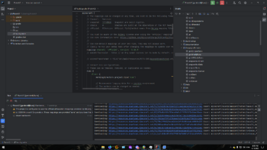
Нельзя скачать ассеты из за Server returned HTTP response code: 400 for URL

Версия Minecraft
1.12.0
API
Forge
При запуске SetupDecompWorkspace в IntelliJ IDEA получаю следующую ошибку, ими просто спамит но ассеты не скачивает (в дальнейшем из за этого крашит иногда) Насолько я понял, это из за того, что он пытаеться скачать его через HTTP, а нужно через HTTPS (если вручную перейти по ссылке и поменять HTTP на HTTPS то получим прямую ссылку на файлы майна, то бишь нужные нам ассеты)


Код:
java.io.IOException: Server returned HTTP response code: 400 for URL: http://resources.download.minecraft.net/47/47800737d078e751698df291054adc596ba8195a
    at sun.net.www.protocol.http.HttpURLConnection.getInputStream0(HttpURLConnection.java:1900)
    at sun.net.www.protocol.http.HttpURLConnection.getInputStream(HttpURLConnection.java:1498)
    at java.net.URL.openStream(URL.java:1068)
    at net.minecraftforge.gradle.tasks.DownloadAssetsTask$GetAssetTask.call(DownloadAssetsTask.java:189)
    at net.minecraftforge.gradle.tasks.DownloadAssetsTask$GetAssetTask.call(DownloadAssetsTask.java:150)
    at java.util.concurrent.FutureTask.run(FutureTask.java:266)
    at java.util.concurrent.ThreadPoolExecutor.runWorker(ThreadPoolExecutor.java:1149)
    at java.util.concurrent.ThreadPoolExecutor$Worker.run(ThreadPoolExecutor.java:624)
    at java.lang.Thread.run(Thread.java:748)
Error downloading asset (try 4) : minecraft/sounds/music/game/hal3.ogg

Видел в учебнике решение для 1.7.10, но для 1.12 оно не сработало, возможно я что то не так сделал? прикрепляю build.gradle и gradle-wrapper.properties

gradle-wrapper.properties:
distributionBase=GRADLE_USER_HOME
distributionPath=wrapper/dists
distributionUrl=https\://services.gradle.org/distributions/gradle-4.4.1-bin.zip
zipStoreBase=GRADLE_USER_HOME
zipStorePath=wrapper/dists

build.gradle:
buildscript {
    repositories {
        jcenter()
        maven { url = "https://maven.minecraftforge.net/" }
    }
    dependencies {
        classpath 'net.minecraftforge.gradle:ForgeGradle:2.3-SNAPSHOT'
    }
}
apply plugin: 'net.minecraftforge.gradle.forge'
//Only edit below this line, the above code adds and enables the necessary things for Forge to be setup.


version = "1.0"
group = "me.equivoke.plutonium" // http://maven.apache.org/guides/mini/guide-naming-conventions.html
archivesBaseName = "plutonium"

sourceCompatibility = targetCompatibility = '1.8' // Need this here so eclipse task generates correctly.
compileJava {
    sourceCompatibility = targetCompatibility = '1.8'
}

tasks.withType(JavaCompile) {
    options.encoding = 'UTF-8'
}

minecraft {
    version = "1.12-14.21.1.2443"
    runDir = "run"
    
    // the mappings can be changed at any time, and must be in the following format.
    // snapshot_YYYYMMDD   snapshot are built nightly.
    // stable_#            stables are built at the discretion of the MCP team.
    // Use non-default mappings at your own risk. they may not always work.
    // simply re-run your setup task after changing the mappings to update your workspace.
    mappings = "snapshot_20170624"
    // makeObfSourceJar = false // an Srg named sources jar is made by default. uncomment this to disable.
}

dependencies {
    // you may put jars on which you depend on in ./libs
    // or you may define them like so..
    //compile "some.group:artifact:version:classifier"
    //compile "some.group:artifact:version"
      
    // real examples
    //compile 'com.mod-buildcraft:buildcraft:6.0.8:dev'  // adds buildcraft to the dev env
    //compile 'com.googlecode.efficient-java-matrix-library:ejml:0.24' // adds ejml to the dev env

    // the 'provided' configuration is for optional dependencies that exist at compile-time but might not at runtime.
    //provided 'com.mod-buildcraft:buildcraft:6.0.8:dev'

    // the deobf configurations:  'deobfCompile' and 'deobfProvided' are the same as the normal compile and provided,
    // except that these dependencies get remapped to your current MCP mappings
    //deobfCompile 'com.mod-buildcraft:buildcraft:6.0.8:dev'
    //deobfProvided 'com.mod-buildcraft:buildcraft:6.0.8:dev'

    // for more info...
    // http://www.gradle.org/docs/current/userguide/artifact_dependencies_tutorial.html
    // http://www.gradle.org/docs/current/userguide/dependency_management.html

}

processResources {
    // this will ensure that this task is redone when the versions change.
    inputs.property "version", project.version
    inputs.property "mcversion", project.minecraft.version

    // replace stuff in mcmod.info, nothing else
    from(sourceSets.main.resources.srcDirs) {
        include 'mcmod.info'
                
        // replace version and mcversion
        expand 'version':project.version, 'mcversion':project.minecraft.version
    }
        
    // copy everything else except the mcmod.info
    from(sourceSets.main.resources.srcDirs) {
        exclude 'mcmod.info'
    }
}
 
FG устарел, используй 5.1
Спасибо за ответ, как обновить разобрался сам, но теперь другая ошибка:
log:
Build file 'D:\Coding\Plutonium\build.gradle' line: 10

A problem occurred evaluating root project 'Plutonium'.
[QUOTE] Plugin with id 'net.minecraftforge.gradle.forge' not found.[/QUOTE]

* Try:
Run with --stacktrace option to get the stack trace. Run with --info or --debug option to get more log output. Run with --scan to get full insights.

На форуме форджа был человек с такой же ошибкой, у него спросили, не меняли ли он что то выше той закоментированной линии на 11 строке build.gradle, он ответил что не менял, но в моём случае мне нужно было изменить для того что бы обновить FG, что я могу с этим сделать? Изменённый build.gradle прикрепил:

build.gradle:
buildscript {
    repositories {
        jcenter()
        maven { url = "http://files.minecraftforge.net/maven" }
    }
    dependencies {
        classpath 'net.minecraftforge.gradle:ForgeGradle:5.1.0'
    }
}
apply plugin: 'net.minecraftforge.gradle.forge'
//Only edit below this line, the above code adds and enables the necessary things for Forge to be setup.


version = "1.0"
group = "com.yourname.modid" // http://maven.apache.org/guides/mini/guide-naming-conventions.html
archivesBaseName = "modid"

sourceCompatibility = targetCompatibility = '1.8' // Need this here so eclipse task generates correctly.
compileJava {
    sourceCompatibility = targetCompatibility = '1.8'
}

minecraft {
    version = "1.12-14.21.1.2443"
    runDir = "run"

    // the mappings can be changed at any time, and must be in the following format.
    // snapshot_YYYYMMDD   snapshot are built nightly.
    // stable_#            stables are built at the discretion of the MCP team.
    // Use non-default mappings at your own risk. they may not always work.
    // simply re-run your setup task after changing the mappings to update your workspace.
    mappings = "snapshot_20170624"
    // makeObfSourceJar = false // an Srg named sources jar is made by default. uncomment this to disable.
}

dependencies {
    // you may put jars on which you depend on in ./libs
    // or you may define them like so..
    //compile "some.group:artifact:version:classifier"
    //compile "some.group:artifact:version"

    // real examples
    //compile 'com.mod-buildcraft:buildcraft:6.0.8:dev'  // adds buildcraft to the dev env
    //compile 'com.googlecode.efficient-java-matrix-library:ejml:0.24' // adds ejml to the dev env

    // the 'provided' configuration is for optional dependencies that exist at compile-time but might not at runtime.
    //provided 'com.mod-buildcraft:buildcraft:6.0.8:dev'

    // the deobf configurations:  'deobfCompile' and 'deobfProvided' are the same as the normal compile and provided,
    // except that these dependencies get remapped to your current MCP mappings
    //deobfCompile 'com.mod-buildcraft:buildcraft:6.0.8:dev'
    //deobfProvided 'com.mod-buildcraft:buildcraft:6.0.8:dev'

    // for more info...
    // http://www.gradle.org/docs/current/userguide/artifact_dependencies_tutorial.html
    // http://www.gradle.org/docs/current/userguide/dependency_management.html

}

processResources {
    // this will ensure that this task is redone when the versions change.
    inputs.property "version", project.version
    inputs.property "mcversion", project.minecraft.version

    // replace stuff in mcmod.info, nothing else
    from(sourceSets.main.resources.srcDirs) {
        include 'mcmod.info'

        // replace version and mcversion
        expand 'version':project.version, 'mcversion':project.minecraft.version
    }

    // copy everything else except the mcmod.info
    from(sourceSets.main.resources.srcDirs) {
        exclude 'mcmod.info'
    }
}
 
1686844554894.png

Исправил полным удалением Gradle и переходом на 1.16.5 (Скачал MDK форджа на 1.16.5)
для тех кто столкнулся с той же проблемой как и было выше сказано стоит обновить forge gradle до 5.1.0 в файле build.gradle, если после этого возникли ещё несколько ошибок то проверьте среду JAVA_HOME (что бы её версия была выше 1.8.0_101) и попробуйте вместо net.minecraftforge.gradle.forge применить плагин net.minecraftforge.gradle, у меня вроде как после этого пошёл какой-то прогресс, но вы итоге перешёл на другую версию майна. После этого ассеты исправно грузяться
 
Кстати, столкнулся с этой проблемой.
в ForgeGradle какой то недальновидный вбил
public static final String URL_ASSETS = "http://resources.download.minecraft.net";

перекомпилить это чудо под версией 2_3 сложно, так как там tools идут с подвязкой.
поэтому простой обход.
Это использовать прокси типа Charles.
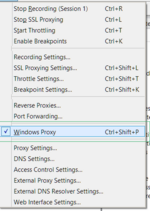
При запуске он становиться как прокси для всей Windows.
1771428369434.png

Это тут видно.
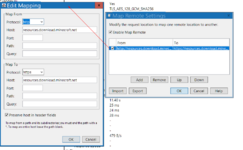
Дальше нужно заставить его : все запросы http переделать в https
1771428436070.png
Для этого делаем такую настройку в меню Tools->Map remote.

Дополнительно в gradle.properties
systemProp.http.proxyHost=localhost
systemProp.http.proxyPort=8888

На этом порту слушает Charles

Дальше можно перезапустить все эти ForgeGradle Tasks.
 
Назад
Сверху