
Приложение
How to install the app on iOS
Follow along with the video below to see how to install our site as a web app on your home screen.
Примечание: This feature may not be available in some browsers.

Вы используете устаревший браузер. Этот и другие сайты могут отображаться в нём некорректно.
Вам необходимо обновить браузер или попробовать использовать другой.
Вам необходимо обновить браузер или попробовать использовать другой.
Работа с framebuffer
- Автор темы Minebot
- Дата начала
-
- Теги
- framebuffer render shader
- Версия Minecraft
- 1.7.10
Решение

Во фрейбуффере вроде есть поле textureID. Суть в том что тебе нужно передать эту текстуру во фрагментный шейдер и отрисовать ее на весь экран.
Ну или можешь достать все пиксели с помощью glGet и в ручную провести изменения и загрузить обратно на GPU конечно, но этого делать не стоит.
Ну или можешь достать все пиксели с помощью glGet и в ручную провести изменения и загрузить обратно на GPU конечно, но этого делать не стоит.

- 2,505
- 81
- 398
Можно конечно же. Это постпроцессинг. Рисуешь сцену в отдельное фбо, затем биндишь начальный фреймбуфер и рисуешь текстуру, которая прикреплена к тому отдельному фбо. Майн 1.7.10 так и делает.

- 1,015
- 9
- 102
А где взять индекс фреймбуффера майна, что бы забиндить?
- 1,015
- 9
- 102
Я что-то не до понял. Как достать кадр из FrameBuffer в виде текстуры, что бы его изменить?

- 1,108
- 47
- 425
Во фрейбуффере вроде есть поле textureID. Суть в том что тебе нужно передать эту текстуру во фрагментный шейдер и отрисовать ее на весь экран.
Ну или можешь достать все пиксели с помощью glGet и в ручную провести изменения и загрузить обратно на GPU конечно, но этого делать не стоит.
Ну или можешь достать все пиксели с помощью glGet и в ручную провести изменения и загрузить обратно на GPU конечно, но этого делать не стоит.
Решение
- 1,015
- 9
- 102
А, нашел
Minecraft.getMinecraft().getFramebuffer().bindFramebufferTexture()
- 1,015
- 9
- 102
Кстати, свой FBO над тоже создавать, я понял почему. Без него там рекурсия
- 1,015
- 9
- 102
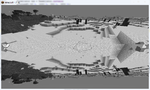
В итоге получилась такая вот ахинея... Я так и не додумался как надо тут использовать свой framebuffer. Черно-белое от шейдера
Java:
    @SubscribeEvent
    public void renderHUD(RenderGameOverlayEvent.Post e){
        glPushMatrix();
        ScaledResolution res = new ScaledResolution(mc, mc.displayWidth, mc.displayHeight);
        Tessellator tes = Tessellator.instance;
        glColor4f(1, 1, 1, 1);
        Minecraft.getMinecraft().getFramebuffer().bindFramebufferTexture();
        ModShaders.blackWhite.start();
        tes.startDrawingQuads();
        tes.addVertexWithUV(0, res.getScaledHeight(), 0, 0, 1);
        tes.addVertexWithUV(res.getScaledWidth(), res.getScaledHeight(), 0, 1, 1);
        tes.addVertexWithUV(res.getScaledWidth(), 0, 0, 1, 0);
        tes.addVertexWithUV(0, 0, 0, 0, 0);
        tes.draw();
        ModShaders.blackWhite.stop();
        glPopMatrix();
}- 2,505
- 81
- 398
Смотри как происходит в Майне по дефолту, если поддерживается фреймбуфер. Создаётся фбо. В начале каждого кадра он биндится, и в него рисуется вообще все (включая гуи и худ). А в конце кадра биндится дефолта фреймбуфер (0), и в него рисуется полноэкранный квад текстуры из фбо, в который все рендерилось.
Ещё в Майне есть механизм постпроцессинга после рендера мира. Это те самые секретные настройки. Смысл в том, что после того, как отрендерился мир, биндится новый временный фбо. В него рисуется полноэкранный квад мира, применяя шейдером какой-нибудь эффект. А затем биндится исходное майнофбо, в который рендерился мир изначально, и в него блитится (рисуется полноэкранный квад простейшим шейдером) текстура временного фбо. Таких цепочек может быть сколько угодно, все настраивается в файле программы.
Лично я выпилил эту систему постпроцессинга, потому что она, мягко говоря, не удобная. Но она поможет понять, как использовать фбошки.
Ещё в Майне есть механизм постпроцессинга после рендера мира. Это те самые секретные настройки. Смысл в том, что после того, как отрендерился мир, биндится новый временный фбо. В него рисуется полноэкранный квад мира, применяя шейдером какой-нибудь эффект. А затем биндится исходное майнофбо, в который рендерился мир изначально, и в него блитится (рисуется полноэкранный квад простейшим шейдером) текстура временного фбо. Таких цепочек может быть сколько угодно, все настраивается в файле программы.
Лично я выпилил эту систему постпроцессинга, потому что она, мягко говоря, не удобная. Но она поможет понять, как использовать фбошки.
- 2,505
- 81
- 398
А в твоём случае происходит так, что забинжен майнофбо, а ты все равно биндишь его текстуру и пытаешься ее нарисовать. Естественно получается грязь.
- 2,505
- 81
- 398
Использовать для глубины не рендер буфер, а текстуру, например.
Или можно блитнуть буфер глубины в текстуру, но это не точно.
Или можно блитнуть буфер глубины в текстуру, но это не точно.

- 4,167
- 68
- 693
Это ж всю сцену заново рисовать, что ли?
А как буфер глубины-то достать?
А как буфер глубины-то достать?


- 1,990
- 18
- 109
Лучший способ, конечно, ничего не копировать и
Но если приперло, то вот инструкция:
Шоб достать существующий буфер глубины достаточно просто сделать блит из одного FBO в другой, но для этого надо уметь немного работать с ними.
Создание аттачмента для глубины
Секцию где устанавливается glRead/DrawBuffer можно пропустить, если у фбошки есть color аттачменты.
Дальше нужно установить из какого FBO в какой копируем.
Собсна, копирование глубины:
Использовать для глубины не рендер буфер, а текстуру, например.
Но если приперло, то вот инструкция:
Шоб достать существующий буфер глубины достаточно просто сделать блит из одного FBO в другой, но для этого надо уметь немного работать с ними.
Создание аттачмента для глубины
Секцию где устанавливается glRead/DrawBuffer можно пропустить, если у фбошки есть color аттачменты.
Дальше нужно установить из какого FBO в какой копируем.
Kotlin:
GL30.glBindFramebuffer(GL_READ_FRAMEBUFFER, sourceFbo.id)
GL30.glBindFramebuffer(GL_WRITE_FRAMEBUFFER, targetFbo.id)
Собсна, копирование глубины:
Код:
GL30.glBlitFramebuffer(0, 0, width, height, 0, 0, width, height, GL_DEPTH_BUFFER_BIT, GL_NEAREST)- 2,505
- 81
- 398
Кое-кто недавно говорил, что профитнее использовать рендер буфер, и блитать его при необходимости 